
Agentless Security for ChatGPT Enterprise, Claude, Copilot
ChatGPT Enterprise, Claude Enterprise and Microsoft 365 Copilot are the AI tools most companies have actually bought. They come with an admin console, a contract and retention settings, and that is where many security teams' visibility stops. Who used them for what, which conversations touched sensitive data, which agent sessions did more than anyone asked: those answers sit in each vendor's tenant, in each vendor's format. Today we're making ChatGPT Enterprise security, Claude Enterprise security and Microsoft 365 Copilot security part of the same picture as the rest of your AI use, with nothing to install.
Agentless: connect the tenant, not the laptop
Our endpoint agent sees what AI does on a managed machine. But a lot of enterprise AI use never touches one: a browser on a personal laptop, a contractor's machine. If the account is your company's, the activity is your company's, and it should be visible wherever it happened.
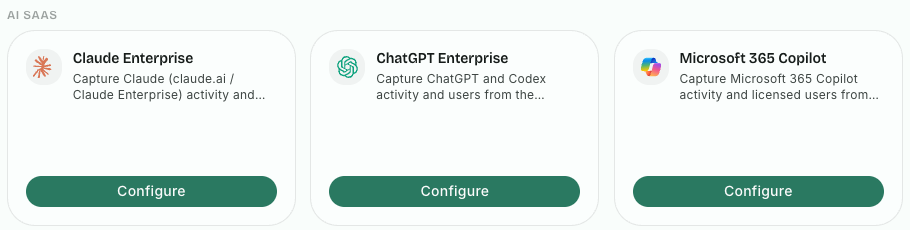
So these three connect at the tenant. An admin connects your organization's Claude Enterprise, ChatGPT Enterprise or Microsoft 365 Copilot from the Integrations page, and the activity comes in. No agent, no browser extension, nothing on anyone's machine.
What you see for each
- Claude Enterprise: claude.ai chats on the web and in the desktop app, Cowork sessions, and Claude Code sessions.
- ChatGPT Enterprise: ChatGPT conversations and Codex sessions.
- Microsoft 365 Copilot: the Copilot interactions of your licensed users.
None of this needs your users to do anything, and it covers everyone with a seat, not only the people whose machines you manage. Contractors, people on an unmanaged laptop, the engineer who prefers the web app: if they use your company's account, their activity is in view.
Each conversation and session lands in Activity, next to what the endpoint agent already records, attributed to the person in your directory, not to an opaque account ID. One place to search, one place to hunt, one timeline per user, whichever AI tool they used and wherever they used it.
Why a single view matters
Security teams don't fail for lack of logs. They fail because the logs that matter are in five places, and nobody correlates them. When a session goes wrong, the questions are always the same: who was it, what did the AI do, what data did it touch, and has it happened before? Answering them across a vendor console, an endpoint tool and a browser tool, each with its own idea of who "the user" is, takes days.
With the enterprise tenants in the same Activity view, the answer takes a search. A Codex session and a Claude Code session by the same engineer sit side by side. What used to take three consoles takes one. And when legal or compliance asks how the company's AI accounts are actually used, you answer from the record, not from a survey of the people who use them.
That matters because the risks in these sessions are real, even in the "approved" tools. We wrote about what we see in 100k enterprise AI sessions: agents hunting for credentials when a task gets blocked, and untrusted content turning into instructions. Being approved doesn't make a session safe; it makes it yours to watch.
Agentless and endpoint, together
Agentless coverage is visibility: it shows what happened in your enterprise tenants. When you need to stop something before it happens, on a machine you manage, that is the endpoint agent, which enforces your policies: blocking personal and unapproved AI accounts, disallowed AI apps, risky MCP servers and unsafe prompts, beside the posture score and risk worklist.
The combination is the point. Managed machines get the depth of the endpoint. Everything else your enterprise accounts do, on any device, is still in view. Our environments page shows what each surface covers.
Getting started
If you run any of the three, an admin connects it from the Integrations page, and the activity starts arriving. Pick the page for the tool you care about most:
Or start a free trial and connect your enterprise AI tenants today.
Related posts
Deploy AI Agent Security with Intune, Jamf and Your EDR
Microsoft Intune, Jamf Pro and Iru (formerly Kandji) bring your fleet and groups in, and CrowdStrike, Defender and SentinelOne show machines missing the agent.
Read More
AI Security Posture Score and Automated Investigations
One AI security posture score for your fleet, a risk worklist that drives it, and AI-written investigations of risky agent sessions, in our redesigned console.
Read More
Restricting AI Agents When No Human Is Watching
Learn how restricted sessions apply security by design to the agentic risk model, limiting data exfiltration and unsafe actions in AI agents.
Read More