
Deploy AI Agent Security with Intune, Jamf and Your EDR
Every security tool that lives on the endpoint has the same first problem: getting onto the endpoints. An agent protects the machines it is on, and the ones it misses are rarely random. This month we connected Autonomous Security to the tools you already use to run your fleet, so you can deploy AI agent security through Intune, Jamf Pro and Iru, scope it with the groups you already maintain, and use CrowdStrike, Microsoft Defender or SentinelOne to find the machines it hasn't reached yet.
Your MDM already knows your fleet
Your MDM is the source of truth for which machines exist, who they belong to and how they are grouped. We didn't want you to rebuild any of that in another console. So the MDM integrations bring it in:
- Microsoft Intune: your Intune devices with their Entra ID users and groups.
- Jamf Pro: your Jamf-managed Macs and their computer groups, with each Mac's assigned user matched to the people in your directory.
- Iru (formerly Kandji): your Iru fleet and each device's primary user, and agent deployment from our console.
- JumpCloud, as before: devices and groups, and deployment in one click.
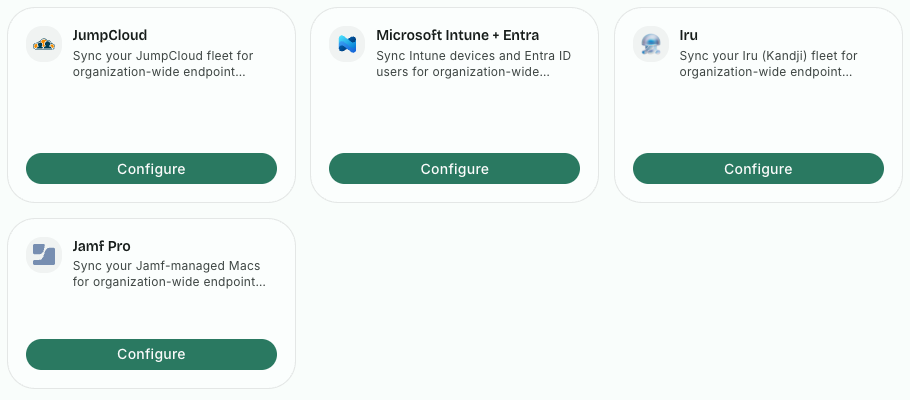
The machines appear on the Endpoints page with their users. And the groups you choose become policy groups, next to the ones your directory sync from Okta or JumpCloud brings in, so a policy can apply to "Engineering Macs" or "Contractors" the way your MDM already defines them.
Deploy the agent the way you deploy everything else
Nobody wants a new rollout process for one more agent. With Iru and JumpCloud you deploy the agent from our console. With Intune and Jamf Pro you push it from their own console, as you push every other managed app, to the groups you choose. The agent runs on macOS, Windows and Linux, and the Windows installer is a signed MSI, which is what managed deployment expects.
AI in the browser needs the browser extension, which we first shipped as an alpha in June, and it goes out the same way: we publish deployment guidance for the Chrome and Edge extensions, and the package and configuration profiles for Firefox.
The result is a rollout your IT team recognizes. The agent arrives on the groups you target, the machines show up in the console with their users, and from the first scan you see the AI apps, accounts, MCP servers and skills on each one.
Your EDR knows which machines you're missing
Deployment always leaves gaps: a machine that was offline, a new hire's laptop, a group someone forgot, a device that left one MDM and never joined another. You won't find them by looking at the machines that report, because the gap is the machines that don't.
Your EDR is usually the one tool already on every machine. So we connected to CrowdStrike Falcon, Microsoft Defender and SentinelOne: their device inventories come in, and you can see the endpoints that have your EDR but not our agent. That is the list to close, and it shrinks as you deploy.
This matters more for AI than for most tools. The developer who installs a new AI agent, signs in with a personal account and connects it to MCP servers is usually on the machine that was set up in a hurry. Coverage you can measure is coverage you can defend in a review.
Why we built it this way
We could have asked you to install by hand and then trust that it went everywhere. Security teams don't work like that, and neither does IT. The MDM decides where the agent goes, the directory and MDM groups decide which policy applies, and the EDR is the independent check that nothing slipped through. Each tool keeps doing its own job, and together they answer "are we covered?" with a list rather than a guess.
Once the agent is on a machine, everything else follows: the AI security posture score and risk worklist, blocking personal AI accounts and unapproved AI apps, and, for the AI use that never touches a managed machine, agentless coverage of ChatGPT Enterprise, Claude Enterprise and Microsoft 365 Copilot. Our environments and integrations pages list what is covered.
Try it
Connect your MDM and your EDR, deploy to one group, and see what you've been missing. Start a free trial.
Related posts
Agentless Security for ChatGPT Enterprise, Claude, Copilot
Connect Claude Enterprise, ChatGPT Enterprise (with Codex) and Microsoft 365 Copilot and see every chat and agent session in one place, with nothing to install.
Read More
AI Security Posture Score and Automated Investigations
One AI security posture score for your fleet, a risk worklist that drives it, and AI-written investigations of risky agent sessions, in our redesigned console.
Read More
Restricting AI Agents When No Human Is Watching
Learn how restricted sessions apply security by design to the agentic risk model, limiting data exfiltration and unsafe actions in AI agents.
Read More