
MCP Gateway: Org-Wide MCP Servers, Per-User Sign-In
Every team that adopts AI agents ends up connecting them to the same tools: the issue tracker, the CRM, the chat workspace, the docs. Today each developer does it alone, with a token pasted into a config file. From today, the Autonomous Security MCP Gateway lets an admin add an MCP server once for the whole organization, gives every person their own sign-in to it, and lets security decide what each tool may do.
Why an MCP gateway
Here is how MCP servers usually spread. Someone finds that their agent is far more useful with access to the project tracker. They create a personal access token, paste it into their agent's configuration, and tell their team. A month later the same server is configured on dozens of laptops, some with personal tokens, some with a shared one someone posted in a channel, some pointing at a copy of the server from a public repository.
Each of those is a small decision. Together they are a problem:
- Tokens on laptops: long-lived credentials sit in plain configuration files, one per person per tool, and nobody can list them, let alone rotate them.
- Shared identities: when a team shares one token, every action looks like the same user. The audit log of the tool behind it can't tell you who did what.
- No control over the tools: an MCP server exposes everything it has. If it can delete, every agent that loads it can delete.
- No inventory: security finds out which servers are in use after the fact, if at all.
We have written about the general rule before: agents should get access to actions, not the credentials behind them (token vault architecture). The MCP Gateway applies it to the MCP servers your whole organization shares.
Org-wide MCP servers, added once
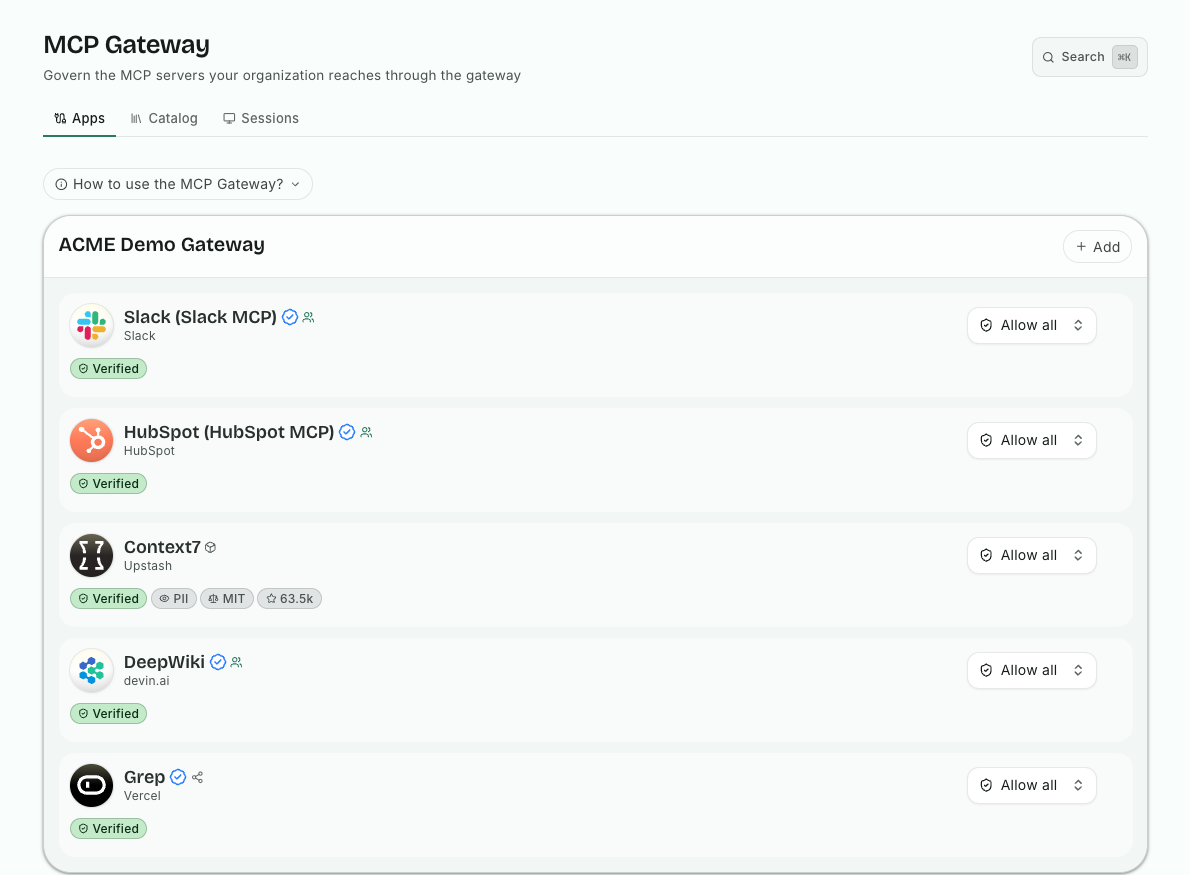
An admin adds an MCP server to the organization's gateway: one from our catalog, or a custom server of your own. Custom servers get an automatic security review when they are added. Each server then has its own endpoint, and every member connects to it from Claude, ChatGPT or any MCP client, without installing or configuring the server themselves.
Setting up a gateway is one click with sensible defaults, and its settings live in one place.
Per-user sign-in, not shared tokens
The part that changes the most is identity. When a member first uses a server that needs their account, such as the CRM or the chat workspace, they sign in to that service as themselves. From then on, their agent acts as them: with their permissions in that tool, and with their name in its audit log.
No token is pasted into a config file on their laptop. When someone leaves, or a token needs to go, it is handled in one place. And for a server that does need a value from the admin, the admin decides which settings they provide for everyone and which each member provides for themselves.
Decide what each tool may do
Adding a server is not the same as allowing all of it. For each server on the gateway, an admin chooses which tools are allowed, and changes to those permissions are staged before they apply.
Below the tool, there are argument restrictions: rules on the values a tool may be called with. Some examples of what teams use them for:
- the database query tool may run only against the analytics schema;
- the issue tracker's tools may touch only one project;
- the file tool may read only under one path.
The agent still gets a useful tool. It just can't be talked into using it somewhere else.
See who uses what
The gateway's activity view shows which users and which clients talk to which MCP servers. For a security team, that is the inventory that was missing: not what someone said they set up, but what is actually being called, and by whom. Together with the endpoint agent's inventory of what is configured on each machine (shadow AI inventory), it shows both the servers you provide and the ones people brought themselves.
An example
A company's developers use the project tracker's MCP server, each with a personal token in their agent's settings. The security team adds the server to the gateway, allows its read tools and its create-ticket tool but not delete, and restricts it to the engineering projects. Developers switch their agent to the gateway's endpoint and sign in once with their own account.
The tokens on laptops can now be revoked. Every ticket an agent creates carries the name of the person whose agent created it. And the next team that wants the tracker in their agent gets it by connecting, not by pasting a token.
Try it
Learn more on the MCP Gateway page, or start a free trial, add the MCP server your teams use most, and connect your first agent through the gateway.
Related posts
The Agentic Ecosystems Is Booming
From this article, you learn how the explosive growth of AI agents, MCP servers, plugins, and skills is creating an entirely new cybersecurity challenge for enterprises. It explains why MCP adoption is accelerating across organizations, why traditional endpoint security tools are no longer enough, and how risks such as malicious open-source packages, exposed API keys, and prompt injection attacks are expanding the enterprise attack surface. The article also introduces Autonomous Security, a new enterprise tool that provides visibility, guardrails, and real-time protection for AI agents without slowing productivity, helping organizations securely scale AI adoption while maintaining governance and control.
Read More
We Built an Impenetrable Token Vault for Your Secrets
This post explains how we safeguard our customers' secrets in today's integrated world of agents and MCP servers.
Read More
LiteLLM Guardrails: Security for Your LLM Gateway
LiteLLM guardrails from Autonomous Security: mask secrets in requests, block unsafe requests, check every answer, and see each decision in Activity.
Read More