
AI Security in Your SOC: API, Webhook and IBM QRadar
A SOC doesn't need another console. It needs the signal in the tools it already lives in: the SIEM where correlation happens, the ticketing system where work is assigned, the automation that closes the loop. AI agents are now a real source of security events, so AI security belongs in your SIEM and your SOC workflows, not in a tab someone remembers to check. Over the last few weeks we've shipped what makes that possible: a public API with scoped keys, a findings API and webhook, and, today, an IBM QRadar integration.
Findings that your team can own
It starts in the console. Every finding, whether a risky AI app, a personal account, a secret in a skill or a session that went wrong, now has an owner, a status that moves through a lifecycle, and a comment thread that keeps the discussion with the finding. Comments are append-only, so the record of who decided what stays intact. The worklist is the same for every admin.
That is the model the rest of this builds on: findings are work items, and work items need to reach the systems where work happens.
A public API with scoped keys (beta)
The public API lets your own tools do what the console does with findings: read them, assign them, triage them and comment on them. It is versioned, and it is in beta: it may still change as we add to it.
Every key is scoped. When you create one, you choose exactly what it can do: read findings, manage findings, read the audit log. A key for your SIEM's export reads the audit log and nothing else. A key for your ticketing integration manages findings and can't touch anything else. Least privilege for machines, the same way the console's roles give it to people. Keys you already use for audit-log export keep working.
Findings pushed to you: the webhook (beta)
Pulling is fine for a nightly job. For the work that can't wait, the findings webhook pushes. Turn it on, point it at your endpoint, and new findings, and findings whose triage changed, are delivered to it. You choose the minimum severity (High and above by default) and the categories you care about, so your automation only hears about what it should act on. Like the API it comes with, it is a beta.
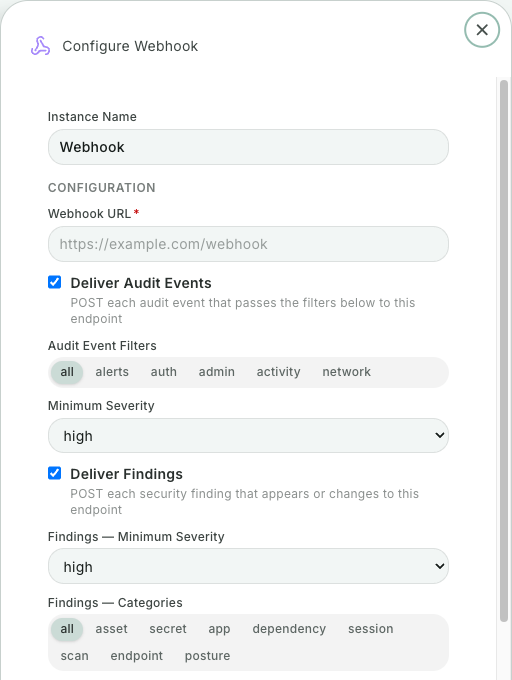
A setup that works: the webhook opens a ticket for every new High finding, the ticketing system assigns it, and when the analyst resolves it, the API writes the decision back to the finding. The console and your SOC stay in step about what's open.
Audit logs in IBM QRadar
Security teams on IBM QRadar can now bring our audit log into it from a one-click integration. Creating it mints a key scoped to the audit log alone and gives you QRadar's setup files with that key and your host already filled in. Deleting the integration revokes the key. Nothing to copy by hand, and no key that outlives the integration it was made for.
Once it is in QRadar, AI agent activity is one more source to correlate with the rest: the endpoint, the identity, the network. That's where an AI agent's odd behavior meets the rest of the story.
For the things that need a human right now, policy-enforcement alerts and findings also go to a Slack channel.
Why this matters
When we started, the question was "can we even see what AI agents do?". Now that teams can, the question is operational: who owns this finding, is it in our queue, did the SOC see it, can we prove what we did about it? The answer can't be "log in to one more console". It is your SIEM, your tickets, your automation, with AI agent security as one more source that speaks their language.
It also closes the loop on the rest of what we shipped this summer: the enforcement of personal AI accounts and unapproved apps and the fleet you deployed through your MDM end up as findings and audit events your SOC can work, with the agentless activity from ChatGPT Enterprise, Claude Enterprise and Microsoft 365 Copilot beside them in the console. Our integrations page lists the rest, and pricing has the plans.
Try it
Create a scoped key, point the webhook at a test endpoint, and watch your first findings arrive. Start a free trial.
Related posts
AI Agent Data Leakage: Catch the Read, Then the Send
AI agent data leakage happens when a session reads sensitive data and then sends it somewhere you don't trust. Autonomous now flags or blocks that send.
Read More
Agentless Security for ChatGPT Enterprise, Claude, Copilot
Connect Claude Enterprise, ChatGPT Enterprise (with Codex) and Microsoft 365 Copilot and see every chat and agent session in one place, with nothing to install.
Read More
Block Personal AI Accounts and Unapproved AI Apps
Block prompts from personal and unapproved AI accounts, stop disallowed AI apps on Windows, macOS and Linux, and see what was blocked on the Enforcement page.
Read More