
AI Agent DLP: Email, Git, MCP and Blocked Destinations
With a deterministic DLP guardrail running in real time, you can give agents access to sensitive data in your CRM or production database while enforcing where that data can go next. For anyone who has wanted to connect agents to these systems but held back for fear of a leak, this changes what they can confidently let their agents do.
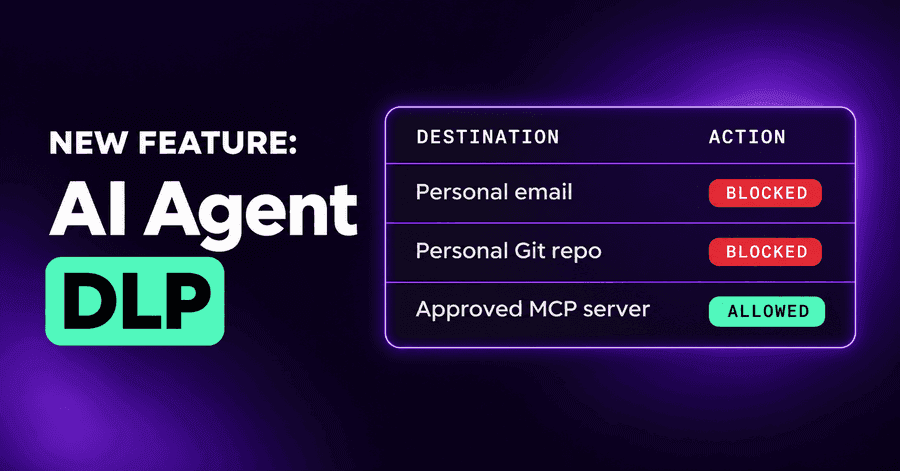
AI agent DLP has a simple goal yet probably most important: a sensitive read, then a send somewhere it shouldn't go. Over the last month we have moved that boundary to the places agents actually send data: email, code pushed to a personal repository, MCP servers and connectors, and a list of destinations no agent may send to at all. Here is what changed, and what each one catches.
Where AI agent data leakage happens now
When we wrote about AI agent data leakage in September, the boundary was drawn with domains, code organizations and cloud accounts: mark what is sensitive, mark where data may go, and a session that reads one and sends to somewhere else is flagged, or blocked under Enforce.
That covered the web. Agents don't only use the web. They read and send email through connectors. They push code. They talk to MCP servers with no address anyone would recognise, and to a chat workspace that shares its provider's domain with every other customer. A boundary that can only name a domain leaves those sends unjudged, and a security team can't see why a session was marked "possible data leakage" when the destination has no name.
Code pushed to a personal repository
Company code doesn't only leave through a paste site. It can leave through a push: a developer's agent is asked to "back this up to my GitHub", creates a repository under a personal account, and pushes. Everything about the command looks normal.
Company code written to a repository the company doesn't own is now flagged as possible data leakage. When the code came from an organization you marked sensitive and the repository is clearly outside the company, it counts as a crossing like any other: recorded in Monitor, blocked in Enforce. By default some writes are only flagged, such as a new repository created under whatever account the developer is signed in with, or a destination whose owner nobody can tell, because a false block on an ordinary push costs more than a flag.
Email as a source and a destination
An agent with a mail connector can read a thread from your legal team and, three steps later, send a summary to someone outside. For the mail tools Autonomous recognises, email is now part of the boundary in both directions:
- As a source. Mark a sender domain as sensitive, say your own legal or finance domain, or a key customer's. When an agent reads a message from it, the session carries that message's sensitivity, exactly as a read from a sensitive system does. An ordinary message in the same inbox doesn't.
- As a destination. A send is judged by every recipient. An outside address in To, Cc or Bcc is a crossing, even when the mail service itself is trusted: trusting the provider never vouches for the people on the To line.
A saved draft is not a send.
MCP servers and connectors on the trusted list
The trusted list, and the sensitive list beside it, now take two more kinds of entry: an MCP server and a connector workspace.
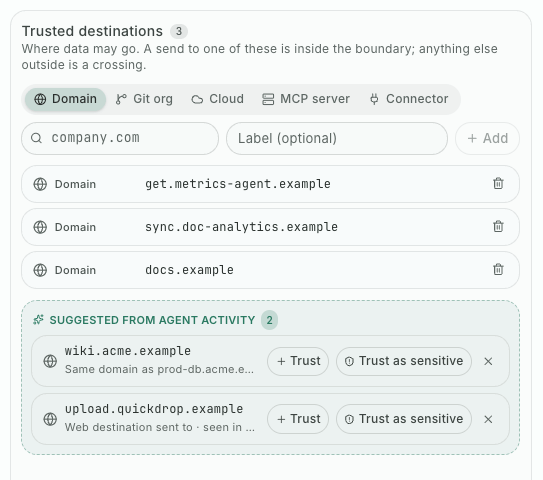
You pick them from what your agents actually use, rather than typing hostnames. Your internal knowledge-base server can be a trusted destination; your company's chat workspace can be trusted while someone else's isn't; a server that reads your customer database can be a sensitive source. If a trusted server later moves somewhere else, the entry says it changed, and you choose whether to trust the new place.
Sessions marked "possible data leakage" with no named destination often came from these. Naming the server or the workspace answers them, and updated endpoint agents enforce the same entries.
A list of destinations agents may never send to
Sometimes the question isn't "did sensitive data reach an untrusted place". It is "nothing should go there, ever". A paste site, a file-drop service, an AI tool your company decided against, a competitor's domain.
Blocked destinations is a third list on the DLP page, with the same kinds of entry. A send to a blocked destination is a violation by itself: no sensitive read is needed, and it wins over a trusted entry for the same place. It follows your one DLP enforcement setting: blocked in Enforce, recorded in Monitor, nothing when DLP is off. Only sends count, not plain visits. The list starts empty, and you can block destinations straight from the ones your agents have been seen sending to.
An example
An engineer asks an agent to clean up a release branch and "send the notes to the vendor". The agent reads an internal thread from the security team's domain, which is marked sensitive, drafts the notes, and sends them with the vendor in To and a personal address in Bcc. The vendor's domain is trusted; the personal address isn't.
The send is judged by both recipients. The Bcc is a crossing, and under Enforce the email doesn't go. In Monitor, it goes, and the session is marked as a crossing for the security team to follow up. Earlier that week, the same agent tried to upload a log bundle to a file-drop site on the blocked list. That was stopped too, without any sensitive read before it.
Where to start
Add the senders and servers that matter most as sensitive sources, your own MCP servers and workspaces as trusted destinations, and two or three places nothing should reach as blocked. Run Monitor for a week and read what it flags. Our earlier post's rollout advice still applies.
Start a free trial and see where your agents' data actually goes.
Related posts
AI Agent Data Leakage: Catch the Read, Then the Send
AI agent data leakage happens when a session reads sensitive data and then sends it somewhere you don't trust. Autonomous now flags or blocks that send.
Read More
AI Security in Your SOC: API, Webhook and IBM QRadar
Scoped API keys, a findings API and webhook in beta, and an IBM QRadar integration bring AI agent findings and audit logs into the tools your SOC already uses.
Read More
AI Security Admin Controls: IP Allowlist, OWASP and MITRE
A console IP allowlist, one Enforcement tab that names the deciding rule, OWASP and MITRE tags on findings, AI spend priced per vendor, and session export.
Read More